arrow_back View all case studies
Case study
Curriculum analytics
A project to design a tool to measure the engagement of University course modules.
🙋🏻♂️ What were we asked to do?
A Product Owner wanted to explore how we could help Universities understand which course modules weren’t engaging students as well as they’d like.
This was a known problem shared with us across multiple institutions: Universities had engagement data, but no clear way to visualise it in a way that made it actionable.
🧪 Hypothesis
The Product Owner had an early idea he wanted to test: a table with a row per course module, and stacked bar graphs in the columns to the right denoting engagement levels against each measure.
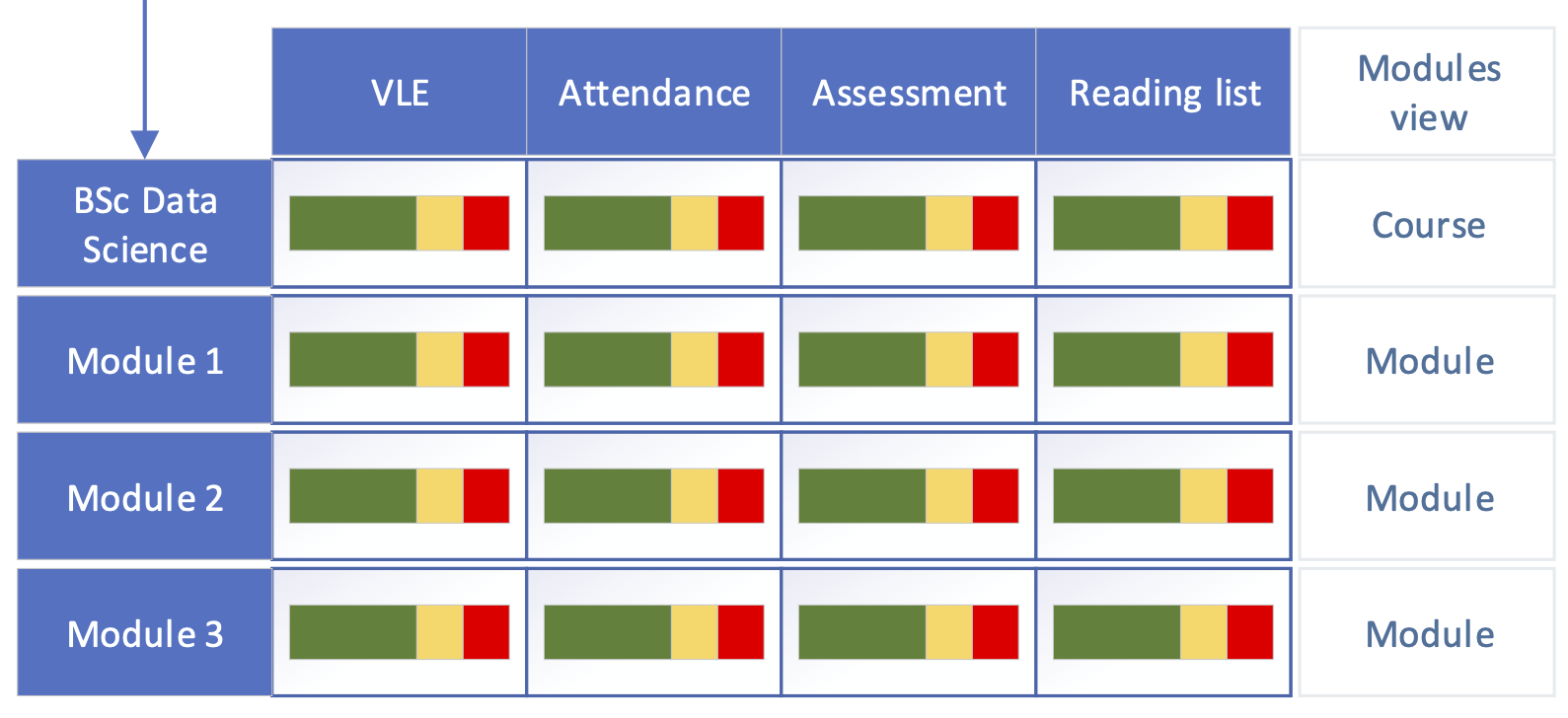
Rather than discard or rebuild the idea myself, I made a deliberate call to run with it as presented. My role here was to validate and shape the Product Owner’s vision through evidence, not to replace it with my own — protecting his ownership of the idea was as important to the outcome as the research itself, particularly given how invested he was in seeing it through.
🔬 Concept testing
I built a low-fidelity, testable wireframe with a bit more detail than the original sketch, then designed and ran a round of concept testing with University staff to gauge their reaction.
The session surfaced real problems: no clear threshold for what counted as “poor” engagement, and ambiguity over what the colours meant.
It also surfaced an accessibility issue — relying on colour alone to convey information would exclude users with colour blindness. I’d flagged this risk from the outset, but I chose not to solve it pre-emptively. It mattered more that the Product Owner witnessed the issue first-hand through user feedback than that I simply told him — a judgement call about when to let research do the persuading rather than asserting it myself.
✨ Ideation workshop
To broaden the pool of ideas, I designed and facilitated an in-person workshop with the Product Owner’s development team — QA testers, the scrum master, and the head of development.
I built a skeleton template and set participants the task of generating as many ways as possible of displaying engagement data within the columns, introducing them to Crazy 8s sketching and supplying the materials needed to run it. The session produced over 70 ideas, and — just as importantly — gave the wider delivery team a direct stake in the direction of the design, which paid off later in how smoothly the build was accepted.
✏️ Concept creation
From the workshop output, I selected three directions to prototype, including one the Product Owner was personally drawn to — a deliberate choice to keep him engaged in the process rather than narrowing to only what I judged strongest.
I turned each into a low-fidelity wireframe and ran a further round of concept testing with the same participant group.
This round moved us meaningfully closer to something that would work for users. The added clarity in the visualisations made the underlying data genuinely more useful, and it did something for the wider relationship too: users could see the organisation was listening and that the product was visibly progressing off the back of their input — a trust dividend that mattered as much as the design improvements themselves.
🎨 High-fidelity design
With confidence in the concept established, I moved to a high-fidelity design, incorporating changes aimed squarely at the outstanding issues raised in concept testing.
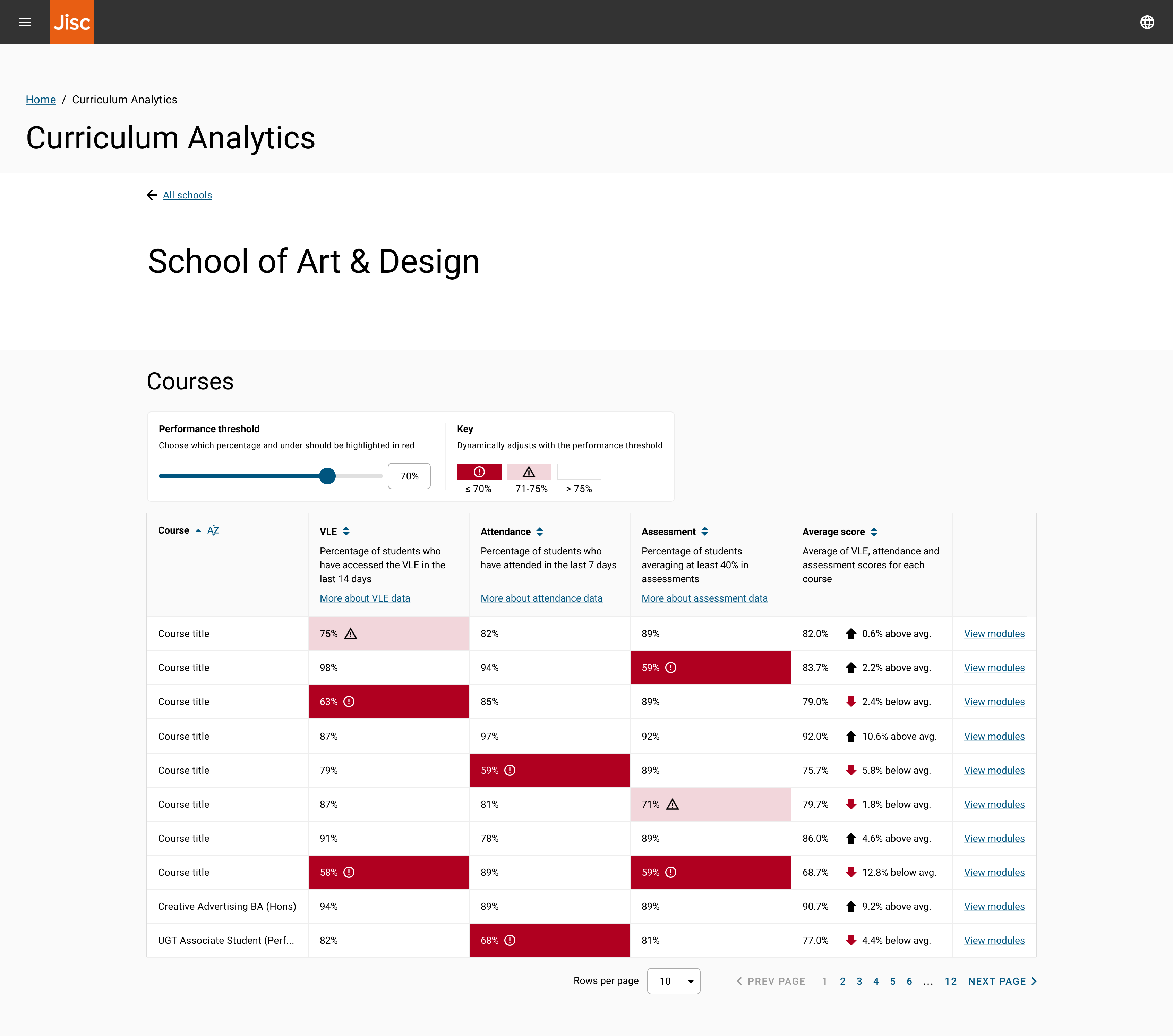
I applied an 8-point soft grid throughout to keep the design consistent, and worked within Material Design, the UI library the organisation had standardised on at the time.
One decision I made was to give users direct control over the engagement threshold via a filter. Every person I’d interviewed held a different view of what “poor” engagement meant, so rather than impose a single definition, I designed the threshold as something the user could set themselves — a judgement call to design for variance in user mental models rather than force consensus that didn’t exist.
The design was handed to a developer, who took it through to build.