arrow_back View all case studies
Case study
Multi-column admin interface
Designing and usability testing a prototype admin interface.
📖 Background
In this project I designed, prototyped, and usability tested a content component for power-users of a publishing company’s in-house Content Management System (CMS).
This built on earlier visual preference testing I’d carried out for a digital magazine app, which had shown that subscribers responded well to content displayed in multiple columns.
It gave readers a break from a single-column layout and made the experience more visually engaging — one participant described it as being “a bit like a game,” since you could choose which column to read first.
To make multi-column layouts achievable for the content team, I identified that they’d need a dedicated interface within the CMS to support it.
🎨 Prototype
The CMS already had components for entering headings, text, and images, so I designed a multi-column component that would arrange these existing components into columns rather than duplicating functionality that already worked well.
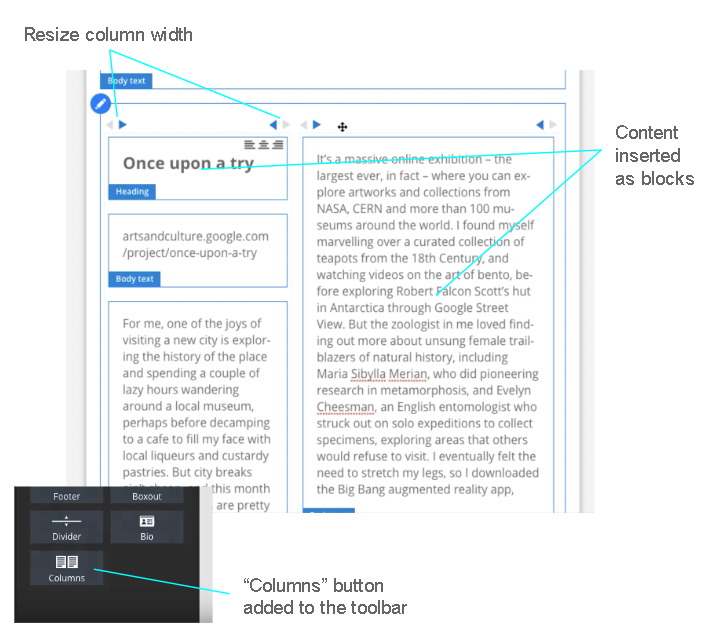
Since this was built for power-users, I made a deliberate choice to keep the interaction patterns consistent with the rest of the admin interface, prioritising familiarity over introducing a novel interaction model they’d have to relearn.
Columns aligned to a 12-column grid, and I designed the interface so users could control both the number of columns and the width of each, giving them room to create genuinely varied layouts. I designed the controls for resizing, adding, and removing columns as part of that same system.
I built a fully interactive, testable prototype in VueJS in two days, running against a development version of the CMS on my laptop (with support from one of the developers to get it wired up), which let me test the component against real content rather than placeholder data.
🔎︎ Usability testing
To test it, I shadowed a member of the content team as they carried out their normal workflow — converting print magazine articles (PDF) into digital HTML articles via the CMS, starting from a crude import and refining formatting against the original layout before publishing.
I set up a crude import of one article and asked them to prepare it for publication, with a single constraint: one section needed to be arranged in three columns to match the print layout. This let me observe the component under a realistic task rather than an artificial one.
The user was able to complete the task, but the session surfaced several clear problems with the component.
🐌 Getting content into a column was slow
Content had to be dragged and dropped into a column from elsewhere on the page. Scrolling and repositioning content piece by piece made this a slow, fiddly process that took the user longer than it should have to populate the component.
⏳ Adding a column was time-consuming
Adding a new column required existing columns to first be narrowed to make space — a dependency that wasn’t obvious, and one the user only worked out through trial and error. Once added, resizing columns to equal widths was similarly fiddly: each resize used a button attached to the column, which moved along with it as the column changed size, forcing the user to keep chasing it with the mouse.
👆 Resizing columns - drag, don’t click
Users instinctively tried to click-and-drag the resize buttons, expecting that to be how the icon worked. That observation told me the underlying interaction model was wrong: dragging was the more natural and faster method, since it let users resize by several columns in one motion rather than one click at a time.
🍿 Popcorn session
I ran a popcorn session with the key stakeholder and developers, screening a recording of the user working through the component’s difficulties, rather than simply reporting the findings second-hand.
The stakeholder opened the session assuming the component was close to finished. By the end, they understood exactly why it wasn’t — and the case for continuing to invest in it had made itself.
🛹 Skateboard version
Since most of the friction centred on resizing, adding, and removing columns, I made the call to strip the component back for a first release — getting something usable into production quickly while the more complex interactions were reworked separately.
This skateboard version included:
- 2 columns of equal width
- No option to add/remove columns
- No ability to resize or re-order columns
- creating new heading, text and image components within columns so content could be copied and pasted instead of slowly dragging and dropping
I tested this simplified version with the same content team member, and it was a marked improvement. By this point, several other stakeholders had joined the testing off the back of the popcorn session, having become invested in the outcome.
Only minor refinements were needed after that round, and the component was signed off as ready for development.
🤝🏻 Handover
I produced a design document setting out exactly how the component should behave across a range of user actions, to hand over to the development team.
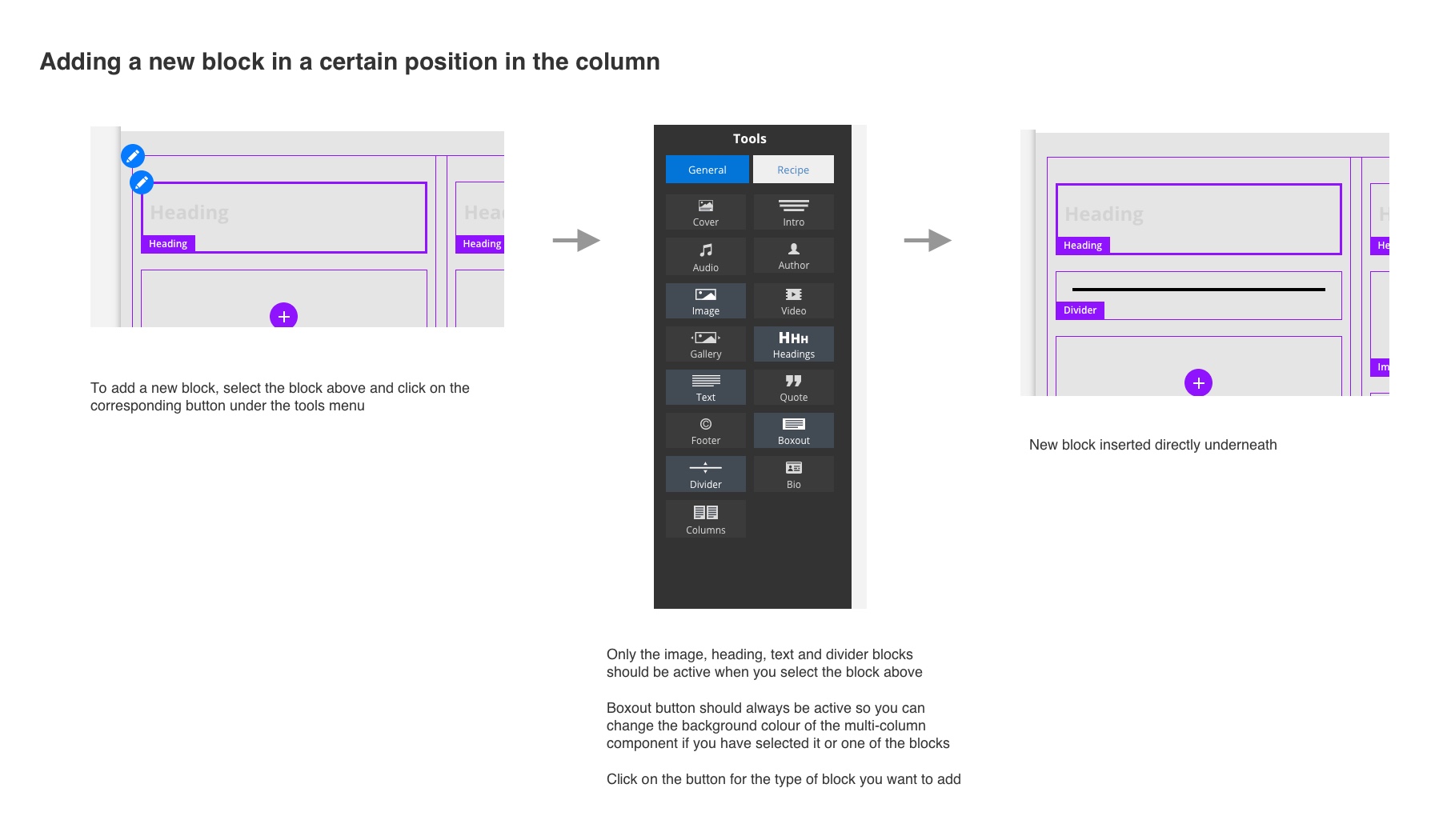
I walked the developers through each interaction against the working prototype directly, rather than relying on the document alone, then followed up with detailed JIRA tickets and acceptance criteria. The developers specifically called out how clearly it set expectations for how the component should behave.
📣 Post-deployment feedback
The component went live and performed as designed. Shortly afterwards, a member of the content team commented in a meeting:
“I used the new multi-column component and it was super easy”
🏁 Conclusion
That feedback mattered to me because it validated the specific intent behind the design — familiarity and speed — rather than just general usability. Had we shipped the first version I’d designed, I don’t think we’d have landed there.
Shadowing the user directly was one of the most valuable parts of this project: it let me see exactly how the component fit into their working day, and gave me a clear, evidence-based basis for the decisions I made to improve it.
The shift in stakeholder engagement over the course of the project was just as significant an outcome as the design itself. Interest was minimal until people saw the prototype performing — and failing — in front of them. Letting the team witness the problems first-hand, and involving them in shaping the improved version, gave them genuine ownership of the outcome, which is why they stayed engaged enough to take part in testing themselves.